Sprout character waving in a green park with a rainbow
Sprout creator video brief

Make one short video showing Sprout in a real family moment.

Start with a moment parents recognize. Show the kid-facing Sprout screen, then end on the parent receipt. Keep names, school details, email, calendar, medical details, and addresses out of frame.

This is a useful family video, not a generic AI showcase or a product walkthrough.

The brief

Make the video about one real family moment.

Start with something a parent would recognize: the backpack check, the reading habit, sports practice, allowance, bedtime, tutoring homework.

The video should make one thing clear: Sprout turns adult context into a next step the kid can use, with a receipt the parent can trust.

1
Choose the moment.Pick one family problem, lesson, routine, or creator format a parent can understand in five seconds.
2
Name the source.Show what you are bringing into Sprout: an AI workflow, a lesson, a checklist, a coaching plan, or a daily routine.
3
Show the kid surface.The kid should see one clear next step, not a dashboard, prompt dump, or abstract product tour.
4
Show the parent receipt.End with what the parent gets back: proof, summary, approval, exception, or progress.
5
Keep it safe.Blur private details. Do not show raw school, email, calendar, medical, address, or child-identifier data.
6
Send the rough version.Email us or book time if you want help making the build clearer before you post.
Who this is for

You just need one kid or family moment worth showing.

You might be technical, educational, or just very close to the daily chaos. The useful part is the moment you can explain plainly.

AI parents and builders

You use Claude Code, Codex, Cursor, Home Assistant, n8n, Shortcuts, scripts, or another AI setup and want the output to reach a kid cleanly.

  • Morning or evening routine
  • Homework or reading helper
  • Screen-time or rewards agreement

Teachers, tutors, coaches

You already have lessons, practice loops, challenges, camp material, or coaching rituals that could become kid-ready Sprout activities.

  • Skill practice with a clear next step
  • Progress proof a parent can understand
  • A reusable activity kids can repeat

Family and lifestyle creators

You know the daily chaos: backpacks, chores, bedtime, allowance, sports practice, forgotten permission slips, and tiny negotiations.

  • A familiar problem in the first few seconds
  • A simple Sprout surface
  • A kid-visible payoff

Build help, if you want us with you.

If you already know what you want to show, this is the rough path. If not, book time and we will help you choose the simplest version.

1
Start from a family context
Use a test family or an existing Sprout family. You only need the kid age range, routine, and boundaries the video needs.
2
Set up the family and kid profile
Add only the everyday context the video needs. Keep private family details out of frame.
3
Connect your AI tool or bring your source material
If you are using an agent, connect Sprout after family setup. If you are a tutor, coach, or teacher, bring the lesson, checklist, or program you want to adapt.
Terminal
claude mcp add sprout --scope user --transport http https://api.sproutparental.com/mcp
4
Check the family state, then make the kid activity
Use family.query_overview after setup, then make a task, canvas, routine, reward, or plan the kid can understand. Save repeatable work as a skill when it is useful.
Creator prompt
Read my Sprout family overview, then make one kid-facing activity for this video.
5
Verify the kid screen and parent receipt
Before recording, make sure the kid can understand the next step and the parent gets the checkpoint, summary, proof, or receipt that makes the moment trustworthy.
6
Book creator setup time
Bring the idea, the source material, or the rough build. We will help you make it clearer before you record.
What to make

Pick a moment a family would recognize.

The best videos are small: one problem, one Sprout surface, one kid-facing next step, one parent receipt.

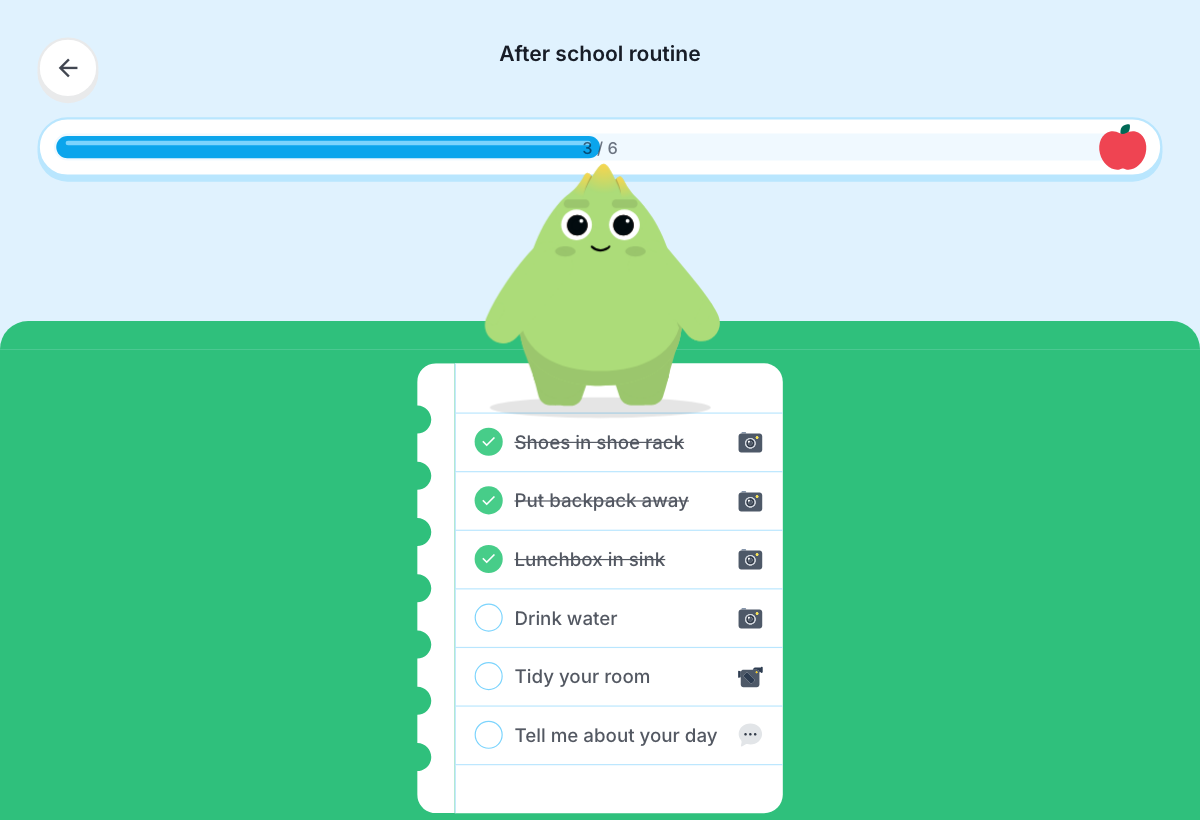
Sprout after-school routine screen

Routine kids can follow

Morning, bedtime, backpack, chores, allowance, room reset, or a practice habit the kid can follow without a parent hovering.

Parent receiptBackpack check
OK
1Kid saw the routine and finished the required steps.
2Private details stay blurred or out of the public video.
3Parent gets the checkpoint without becoming the whole workflow.

Parent checkpoint

A receipt, proof screenshot, summary, approval, or exception that helps the adult stay informed without becoming the whole workflow.

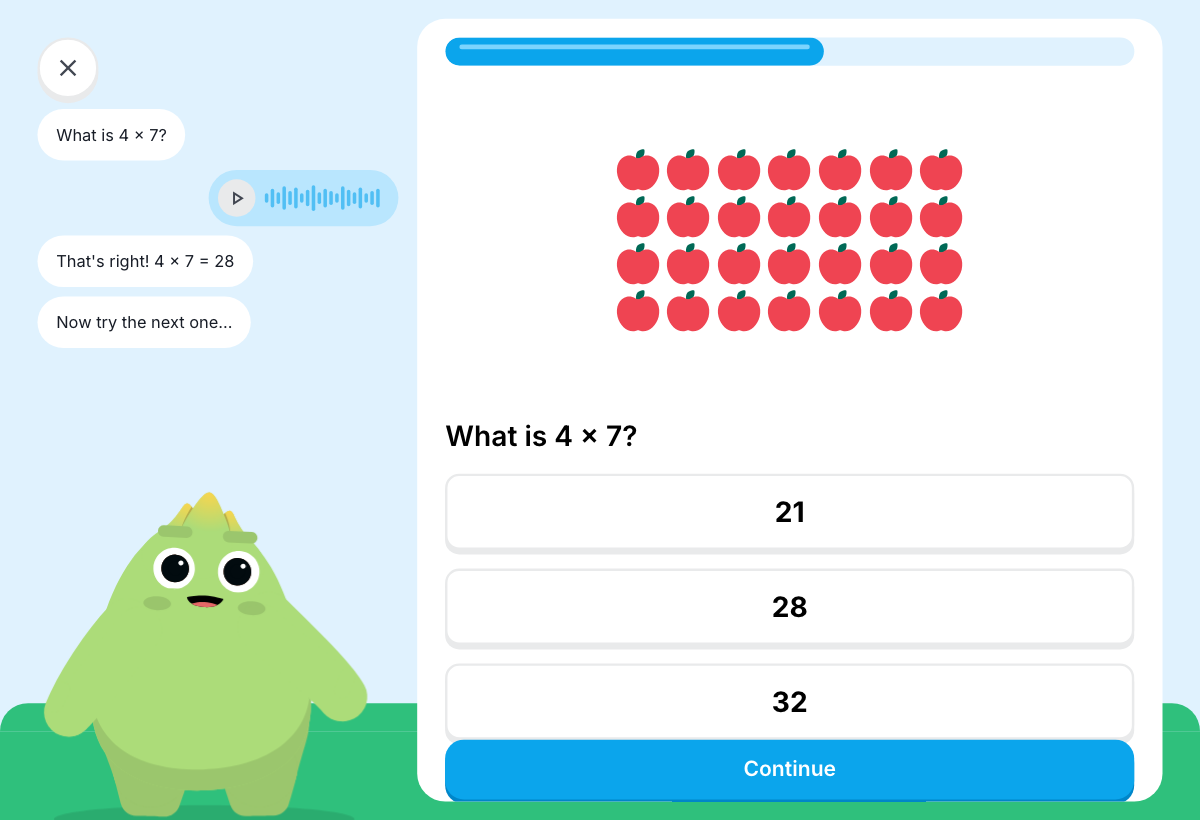
Sprout learning activity screen

Lesson or practice loop

Reading, math, sports, music, executive function, tutoring homework, camp activity, or coaching plan turned into a simple Sprout activity.

  • Source: your program or AI build
  • Kid surface: the next step
  • Parent receipt: what happened
  • Shareable proof: the safe video
How to film it

Film it like a helpful thread.

Open on the family problem. Then show the Sprout surface, the kid's next step, and what the parent gets back.

Example kid-facing Sprout routine screen
0-3 seconds: the problem"My kid forgets the backpack check every morning, and I hate repeating myself."
3-15 seconds: the setup"I signed into Sprout, added the kid profile, and made a backpack routine."
15-45 seconds: the kid screenShow the kid seeing the next step, completing it, earning gems, or getting the prompt.
45-60 seconds: the parent receiptShow what the parent gets back, with private details blurred.
Share safely

Make it feel real without exposing a kid's private life.

Use the real product flow, but keep family data, school data, email, calendar, medical details, addresses, and child identifiers out of the public video.

Good video

Blur names and private details. Use a fake school name if needed. Show the shape of the routine, the Sprout screen, and the parent receipt.

  • "Here is the morning routine I made."
  • "Here is what the kid sees."
  • "Here is what the parent gets back."

Do not show

Raw school emails, calendars, medical information, addresses, child identifiers, private family conflict, or broad safety claims.

  • Do not claim Sprout is "the safest."
  • Do not imply broad compliance claims.
  • Do not show a child's full private profile.
Ready

Want help making the video?

Send us what you are trying to show, or book setup time. If you are ready to build in Sprout, sign up or log in below.